
In SQL Server performance work, the first minutes of an incident often set the direction for everything that follows. CPU is high, storage latency looks uncomfortable, blocking appears in monitoring, or the application reports timeouts. These signals matter, and they often provide the right starting point. Problems begin when teams treat them as if they already explain the issue.
This happens easily in real production environments. Users wait, jobs run late, dashboards show numbers that need an explanation, and several teams may already be involved. Under that pressure, the strongest visible signal quickly becomes the main suspect. A CPU signal turns into a capacity discussion. I/O becomes a storage topic. Blocking becomes a blocking problem. Network waits become a network problem.
Sometimes that first direction is correct. In practice, it often tells only part of the story. SQL Server bottleneck triage is not about ignoring visible symptoms and root causes or delaying action until the team has reviewed every possible detail. It is about understanding what a signal represents in this system, at this point in time, under this workload, before the team commits to a conclusion.
A signal is not the same as a cause
One common mistake in SQL Server troubleshooting is turning a correct measurement into an unsupported explanation. High CPU usage is real. Increased read latency is real. Blocking sessions are real. Long waits are real. But a measurement describes where pressure appears. It does not automatically explain why that pressure exists.
CPU pressure can have different drivers
CPU pressure is a good example. It may come from poor plan choices, outdated statistics, parameter sensitivity, missing indexes, excessive parallelism, or from a workload that has grown beyond the original design assumptions. The visible symptom may look the same on a dashboard, but the right action depends on what actually drives the CPU usage.
I/O pressure is not always a storage problem
The same applies to I/O. Storage latency may point to a real storage issue, but SQL Server can also create heavy I/O pressure through the way it accesses data. A query may read far more rows than needed. An index design may no longer match the workload. A spill may appear only after data volume or memory pressure changes. A reporting process may run against hot operational tables at the wrong time. All of these can make the storage layer look like the main problem. Storage may play a role, but that does not make it the origin.
Blocking shows waiting, not the full cause
Blocking needs the same discipline. A blocked session tells us that work is waiting behind other work. It does not yet explain why a transaction stays open long enough to hurt concurrency, why the same tables meet in the same time window, or why a query that should be short now holds locks for too long. The cause may sit in transaction design, application behavior, isolation level choices, indexing, query duration, batch timing, or in several small operational details that teams have slowly accepted as normal.
Categories help, but they do not replace analysis
Classifying bottlenecks is still useful. CPU, I/O, blocking, network, memory, query plans, and client behavior give structure to a situation that can otherwise become noisy very quickly. A shared category helps the people involved speak about the same part of the system and avoid jumping randomly between symptoms.
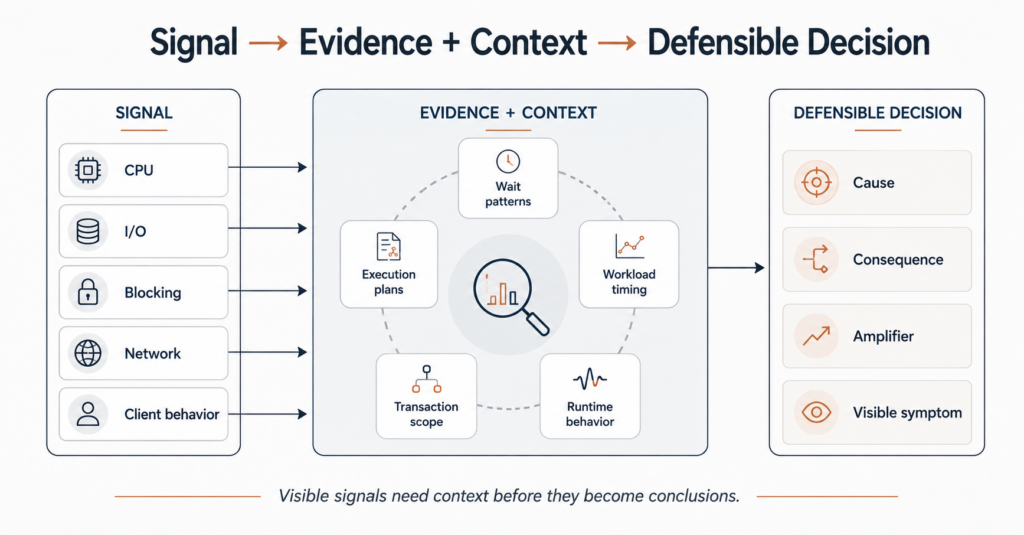
A category becomes risky when people treat it as the conclusion instead of the starting point. Investigations often lose precision at that moment, especially when production pressure makes a quick explanation attractive.
Once a problem has a familiar label, the next step often feels obvious. CPU means query tuning or more capacity. I/O means storage. Blocking means finding and removing the blocker. Network waits mean involving infrastructure or the application team. These reactions are not automatically wrong, but they remain incomplete if no one has tested the label against the actual workload and runtime behavior.
In real environments, these categories rarely have clean boundaries. A poor execution plan can drive CPU and I/O at the same time. Slow queries can hold locks longer and make blocking more visible. Large result sets can create network-related waits that say more about client consumption than about the physical network. Maintenance can shift workload timing just enough that an existing weakness suddenly becomes visible. Data growth can turn an acceptable design into a daily operational problem.
Good triage therefore starts with a more disciplined question: what does this signal mean in this environment, and what evidence supports that interpretation?
Evidence needs workload context
A useful SQL Server bottleneck triage does not depend on one metric alone. It connects evidence to system behavior. Wait patterns, execution plans, runtime statistics, blocking chains, transaction scope, query text, index design, recent deployments, maintenance history, workload timing, and client behavior can all matter. They only help when they explain how the system behaved during the problem.
Wait statistics need interpretation
Wait statistics are a good entry point, but they are easy to overinterpret. A dominant wait type can show where sessions spend time, but it does not always explain why they spend time there. sys.dm_os_wait_stats can help identify accumulated wait patterns, but those patterns still need workload and timing context. PAGEIOLATCH waits may lead to a storage discussion, while queries that read too much data may drive the real pressure. LCK waits may point to blocking, while the useful work is understanding transaction duration, access order, indexing, and workload overlap. ASYNC_NETWORK_IO may look like a network issue, while slow client consumption or oversized result sets may explain the real behavior.
Execution plans need runtime context
Execution plans need the same context. A plan that looks expensive is not automatically the main cause of an incident. It may matter because it runs often, because it changed recently, because input parameters changed, because data distribution shifted, or because it now runs at a time where it collides with other workload. Actual execution plans can provide useful runtime information, but the plan still has to be read together with runtime behavior, timing, and the operational history around the incident.
This is why root cause analysis in SQL Server is rarely a straight line from metric to fix. It usually means separating signals, testing assumptions, and checking whether the visible bottleneck is the origin of the problem, a consequence of another problem, an amplifier, or simply the place where pressure becomes visible first.
Small operational details often decide the outcome
SQL Server environments rarely struggle only because of one large design mistake. More often, performance problems become expensive because no one checked, documented, reviewed, or challenged smaller details for long enough. A structured SQL Server health check can help surface some of those details before they become part of an incident.
A transaction that stays open longer than expected may not look dramatic during normal load, but it can become a concurrency problem during peak activity. A query that reads more data than necessary may be acceptable at one data volume, but not after months of growth. Missing indexes may not matter until a reporting process changes its timing. Maintenance may complete successfully every night, while still interfering with the first important business workload in the morning. Monitoring may raise a technically correct alert that still points to a symptom rather than the cause.
These details are not glamorous, but they matter in daily operations. They often decide whether a performance investigation creates a stable improvement or only reduces the current pressure. In many cases, the expensive part is not the first incident. The expensive part is repeating the same type of incident because the team never fully understood the underlying pattern.
A professional triage should resist premature certainty without becoming slow or academic. Production systems need decisions, and sometimes they need them quickly. The goal is not to collect every possible metric. The goal is to collect enough relevant evidence to avoid fixing the wrong layer with confidence.
A practical way to approach bottleneck triage
A useful way to keep the investigation grounded is to separate observation, interpretation, and action.
Start with the observation
Observation describes what is visible: CPU usage, I/O latency, blocking chains, wait types, query duration, job runtime, application timeouts, or client-side behavior. At this stage, the language should stay precise. “CPU is high” is an observation. “We need more CPU” is already an interpretation and points directly toward an action.
Connect the interpretation to context
Interpretation connects the signal to context. What changed recently? Which workload was active? Which queries or sessions contributed most to the pressure? Did the execution plan change? Is the issue constant or time-bound? Does the same pattern appear across multiple incidents? Does the client consume results slowly? Do transactions run longer than expected? Has data volume changed enough to invalidate earlier assumptions? In cases where plan changes are part of the question, Query Store for performance troubleshooting can provide useful history for queries, plans, and runtime statistics.
Act on the cause, not only the symptom
Action should come after that interpretation. It may still mean query tuning, an indexing change, a storage review, an application discussion, a transaction design change, a configuration adjustment, or a capacity decision. But the reason for the action should be clear: it should address the cause or the relevant contributing factor, not only the place where the symptom became visible.
This approach does not usually make troubleshooting slower. In practice, it often makes troubleshooting faster, because it reduces the time spent on confident but poorly supported directions. The discipline is not in collecting more data for its own sake. It is in connecting the right evidence to the right decision.
The goal is a defensible decision
SQL Server bottleneck triage is not only a technical exercise. It affects operational decisions, escalation paths, infrastructure discussions, application priorities, and the confidence people have in the system. If the team treats the first visible signal as the root cause too early, it may spend time and budget on the wrong layer. If the team uses categories as structure rather than conclusions, the analysis becomes more reliable.
The important question is not only whether CPU, I/O, blocking, network, or the client is involved. A better question is what role each signal plays in the actual chain of behavior. Is it the cause, a consequence, an amplifier, or only the place where pressure becomes visible?
That distinction is often the difference between calming down the current incident and improving the system behind it. A visible bottleneck deserves attention, but the next decision should still rest on a defensible interpretation of the evidence. Without that context, even a correct measurement can send the investigation in the wrong direction.
