
When Wait Stats Become the Explanation Too Early
In many SQL Server performance cases, wait stats are one of the first things people look at once the symptoms become visible. A report takes longer than usual, an application feels slow, users start complaining, and someone runs a query against the wait statistics to get an initial sense of direction.
That is a reasonable place to start. SQL Server wait stats can quickly show where time is being spent, especially in environments where there is no obvious starting point yet. They often provide the first structured signal in a situation that otherwise feels vague.
What I keep seeing in practice, though, is how quickly that first signal turns into an explanation. A dominant wait type appears, the name sounds familiar, and the direction suddenly feels obvious. I/O, CPU, locking. At first glance, the label seems to fit the problem. That is exactly the moment where the analysis can move from observation into assumption.
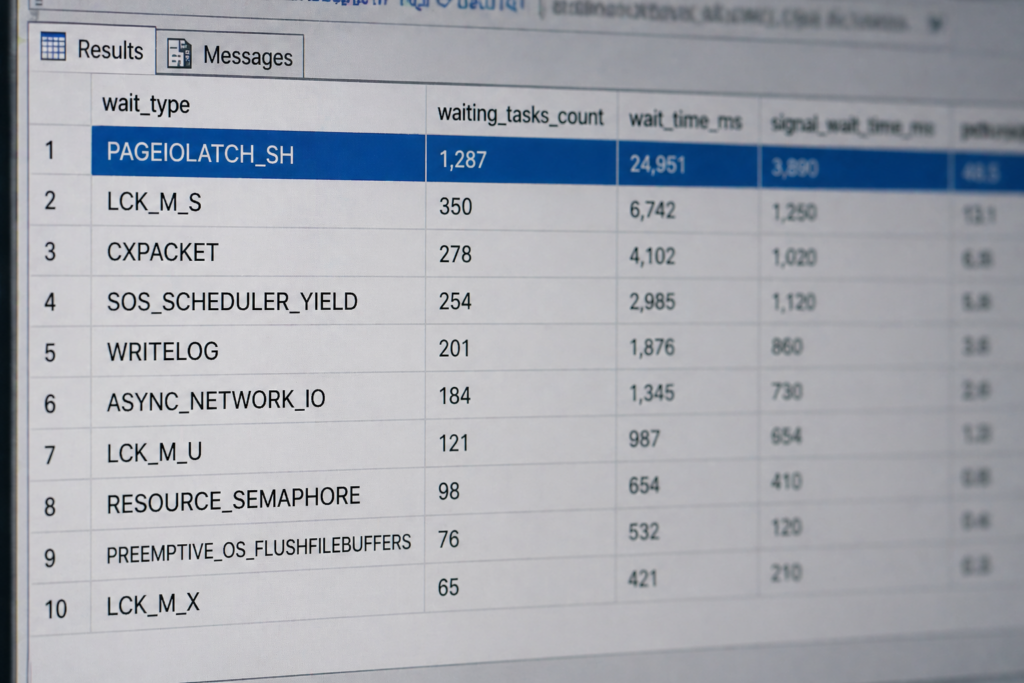
When the Signal Is Treated as the Cause
SQL Server wait stats show where sessions spend time waiting, but they do not explain why that waiting occurs. That distinction sounds small, but it changes how you should read the rest of the evidence.
If you treat the wait type as the diagnosis, you stop too early. If you treat it as a signal, you keep asking what system behavior produced that wait pattern in the first place. In real environments, that difference matters because the same visible wait can come from very different causes.
A higher I/O-related wait might point to storage pressure, but it can also be the visible result of a query reading far more data than necessary. It might come from missing indexes, unsuitable execution plans, inefficient access patterns, or parallelism that amplifies the amount of work being done. From the outside, these situations can look very similar during the first few minutes of an investigation.
This is where familiar wait names can work against you. Once you recognize a pattern, it is tempting to connect it to a known explanation and move on. From that point, the investigation often shifts from understanding the system to confirming an early assumption. Storage gets questioned while the real issue sits in query design. CPU gets blamed while sessions are actually waiting on each other. The wait type still reflects something real, but not necessarily in the way it is being interpreted.
Context Decides How Useful Wait Stats Are
When I step into situations like this, I treat SQL Server wait stats as a starting point, not as the answer. They help narrow the field, but they only become useful when those waits are connected to the workload, the time window, and the behavior of the system around them.
The official documentation on sys.dm_os_wait_stats is useful if you need a reference for how these values are exposed. In practice, however, the important part is not only reading the DMV. It is understanding what was happening while those waits were accumulating.

That means looking at the workload in the relevant time window, not only at cumulative numbers. Which queries were shaping the system at that moment? Were execution plans different from what the environment normally uses? Was there blocking that did not stand out immediately? Did parallelism create more coordination cost than benefit? Was the application sending a different pattern of requests than usual? And just as important, did anything change shortly before the symptoms appeared?
These questions are not a checklist that you go through once and then close. In real troubleshooting work, one observation usually leads to another. Sometimes it confirms the first direction, sometimes it pushes the analysis back to the beginning. The point is to reduce uncertainty step by step instead of forcing the system into the first plausible explanation. A structured view on SQL Server performance analysis helps here because it keeps the investigation from locking in too early.
This is also where many analyses lose time. Not because the tools are missing, but because a plausible interpretation starts to dominate the investigation. Once that happens, alternative explanations are often no longer checked with the same discipline.
Keeping More Than One Explanation Open
One of the most useful habits in SQL Server troubleshooting is to keep more than one explanation open until the evidence becomes strong enough. A single dominant wait type may be important, but it is rarely enough to justify a conclusion on its own.
In many cases that later get labeled as an “I/O problem” or a “CPU issue,” the actual cause sits somewhere else. It may be how sessions interact, how a workload overlaps with maintenance activity, how a query plan changes under different parameter values, or how competing requests create pressure that only becomes visible as waiting.
The difficult part is that these situations can produce wait patterns that look perfectly plausible. The data is not necessarily wrong. The interpretation is what can drift when the visible symptom is treated as the underlying cause.
From Wait Type to System Understanding
SQL Server wait stats do not give you the diagnosis. They show you where to start looking.
What you make of that signal depends on how well you connect visible waiting to the actual behavior of the system. Queries, workload patterns, concurrency, execution plans, infrastructure limits, and changes over time all influence what a wait pattern really means in a specific environment.
That connection is where a performance analysis becomes grounded. The goal is not to name the most dominant wait type as quickly as possible, but to understand why the system is spending time there and whether that wait is the cause, a consequence, or only part of a larger pattern.
Wait stats are valuable because they give structure to the first phase of an investigation. They become dangerous only when they are treated as a shortcut around the rest of the analysis. In production SQL Server environments, the difference between both approaches often decides whether you fix the actual problem or only react to the most visible symptom.
Comments are closed.