
A SQL Server Health Check can be useful even when the environment is not failing or showing an obvious problem. Many systems run reliably for years. Applications are available, scheduled jobs complete, backup processes run as expected and there may be no noticeable performance issue. From day to day, there is little reason to question a system that appears to be doing exactly what it should, especially when nobody is currently reporting a problem.
That is also why some of the most useful findings during a SQL Server Health Check are not failures at all. They are often things that still work, but whose original context has gradually disappeared. SQL Server environments change over time: teams add databases, replace applications, adjust maintenance routines and move infrastructure to new platforms. Administrators leave, responsibilities change and temporary solutions occasionally remain in place much longer than anyone originally expected.
A configuration setting that once solved a specific problem may still exist years later. A SQL Agent job may continue to run every night even though the application it was created for has changed substantially. Somewhere else, a dependency may never have made it into the documentation because everyone involved knew about it at the time. None of this means the environment is badly operated, but a system can still be stable while parts of its operation are no longer fully understood.
What a SQL Server Health Check can reveal about stability
When the surrounding conditions remain similar, a SQL Server environment can continue to behave predictably for a long time. The same applications connect to it, jobs run at familiar times and the infrastructure underneath the workload changes only gradually. Small inconsistencies can remain invisible because nothing forces the team to look at them.
The situation becomes more interesting when something has to change. An upgrade may require the team to understand why someone set a particular database option years ago. During a migration, an application may suddenly reveal that it depends on a local path, a server name or another component that nobody considered part of the migration. This is also why SQL Server upgrade and migration planning should start with understanding the existing environment rather than only the target platform. High availability provides another good example. An Availability Group may look perfectly healthy until the first real failover exposes an application dependency outside the database layer.
At that point, the technical problem is only part of the work. Someone also has to reconstruct how the environment was supposed to function, often while there is already time pressure. This is where knowing the history of a system becomes operationally useful.
Unusual does not automatically mean wrong
One thing I would avoid during a SQL Server Health Check is treating every deviation from a recommendation as something that needs to be fixed. Real environments rarely look like clean reference architectures. A configuration may differ from a common baseline because there is a legitimate workload requirement behind it. A database may use a recovery model that would not be my default choice, but changing it without understanding the surrounding backup and recovery process would be irresponsible.
The same applies to older applications, service accounts, maintenance jobs or settings that teams have carried forward through several generations of infrastructure. The first question is therefore not whether something matches a checklist. I want to know why it is configured that way and whether the reason still applies.
Sometimes the answer is straightforward. The configuration is intentional, the team understands its impact and there is no reason to change it. In other cases nobody can explain where it came from. That does not make the setting wrong either, but it changes the situation because an unexplained dependency makes it harder to predict what will happen during maintenance, migration or failure.
Successful jobs can still hide unanswered questions
SQL Agent jobs are a good example because they are easy to classify as healthy. A job runs successfully every night, there are no failed steps and monitoring stays green. Technically, SQL Server Agent has done what it was told to do. Microsoft describes SQL Server Agent as the service responsible for executing scheduled administrative tasks. The more useful operational question is whether the job is still doing what the organization believes it is doing.
Someone may have created a maintenance routine when the database was much smaller or the workload looked very different. A data-processing job may still run after the surrounding application has changed. Backup jobs may successfully create backup files even though nobody has tested the complete recovery process for quite some time. Microsoft explicitly recommends testing a backup and restore strategy by actually restoring backups and recovering the database. Its SQL Server backup and restore guidance provides the technical background. The job history alone cannot answer those questions.
The same principle applies elsewhere. Monitoring can remain green because the configured thresholds are being met, while the alerts themselves no longer represent the failures that actually matter to the application. Documentation can also exist without being particularly useful if it describes an architecture that has already changed several times. These are not necessarily urgent problems, but they are areas where the perceived state of the environment and the actual operational understanding may have drifted apart.
Findings become useful when they have a consequence
A technical review can easily produce a long list of observations. That is not particularly difficult. The harder part is deciding which observations actually matter and what their operational consequence is.
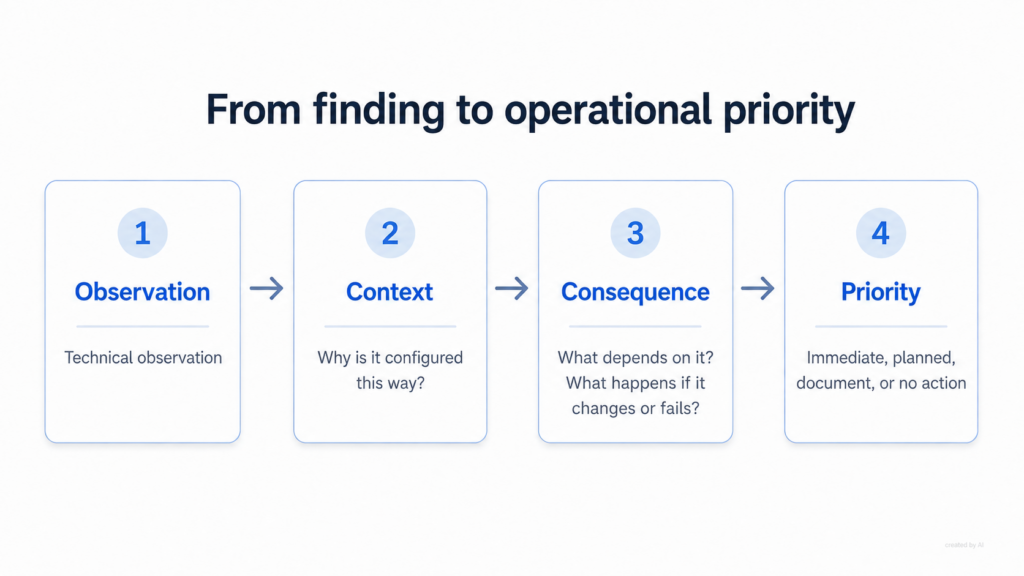
Suppose a backup configuration looks unusual. Before assigning a severity to it, I would want to understand whether it affects the ability to recover the system within the expected time. An undocumented configuration change is different. There, the relevant question may be what depends on it and what could happen if somebody changes it during an upgrade or troubleshooting session.
If a SQL Server instance is part of a high-availability design, the interesting evidence is not simply that the configuration exists. I would want to know whether the team has tested the complete failover path recently enough to trust it, including the application side. The consequence gives the finding its weight.
Without that context, a report can quickly become a collection of technical differences that all appear equally important. In reality, they rarely are. A minor configuration deviation with no practical effect may need nothing more than documentation. An untested recovery process deserves much more attention, even if every backup job has been successful for months. The same principle applies to lifecycle decisions: as I discussed in SQL Server 2016 End of Support: The Real Problem Is Not the Date, a system can continue to look stable while the operational risk around it changes. A security-related finding may require action for yet another reason.
A SQL Server Health Check should help set priorities
I am not particularly interested in producing the longest possible findings list. A report containing fifty observations may look thorough, but it does not necessarily help the person responsible for the environment decide what to do on Monday morning.
Some findings really do need prompt attention, while others are better addressed during the next planned maintenance window or migration project. In a few cases, documenting why something exists may be enough. There can also be situations where changing a technically unusual configuration would introduce more risk than leaving it alone.
That distinction matters because every organization operates under constraints. Time is limited, maintenance windows are limited and technical changes compete with other work. A useful SQL Server Health Check should therefore make the difference between an interesting technical observation and an operational priority visible.
The workload also changes the evaluation. An internal SQL Server used by a small application has different requirements from a platform supporting business-critical transactions around the clock. The same configuration may therefore deserve very different treatment in those two environments. There is no meaningful severity rating without understanding what the system is expected to do and what happens when it cannot.
What I want to understand after the review
After reviewing an existing environment, I want the people responsible for it to have a clearer picture of how much of the current setup is intentional and understood. That includes the dependencies that matter during maintenance or failure. I also want to know whether backup and recovery processes still match the expectations placed on them, and whether scheduled operations are still doing what everyone assumes they are doing.
Unusual configurations do not worry me simply because they are unusual. What matters is whether somebody can explain why they exist and what depends on them. From there, prioritization becomes much easier.
Which findings could affect an upcoming upgrade? Which ones increase recovery risk? Where is the environment relying on knowledge that currently exists only in someone’s head? And which observations are interesting but realistically do not require any change? Those are much more useful questions than whether a server passes or fails a generic checklist.
A SQL Server environment can run well today while still containing decisions that deserve another look. A good Health Check helps identify which of those decisions matter before an upgrade, migration or incident forces the team to find out under pressure.
Foto von TECNIC Bioprocess Solutions auf Unsplash
