
In many SQL Server environments, the first problem with an older version is not the version number itself. The real problem is often that there is no complete and reliable picture of what is still running, which applications depend on it, who owns the systems, and which changes are actually possible without creating new operational risk.
This becomes especially relevant for SQL Server 2016. On July 14, 2026, extended support for SQL Server 2016 comes to an end. From July 15, 2026, organizations that still need more time can move into Extended Security Updates (ESU) Year 1. See the Microsoft Lifecycle Policy for SQL Server 2016.
On paper, that looks like a normal lifecycle milestone. In practice, it is often the moment when older operational decisions become visible again: incomplete inventories, unclear application dependencies, missing vendor statements, undocumented exceptions, and environments that have been running for years but are no longer easy to change.
That is why I do not see SQL Server 2016 end of support as just an upgrade topic. In many environments, it is also a question of whether the organization has enough visibility, ownership, and time left to make a controlled decision instead of reacting under pressure.
What SQL Server 2016 end of support actually means
As long as a product remains in extended support, Microsoft continues to provide security updates. Once that period ends, those regular security updates stop unless the organization moves to an ESU path. Microsoft’s general lifecycle guidance also makes clear that after support ends, customers should no longer expect the regular support model they had before.
That does not mean a SQL Server 2016 instance will suddenly stop working on July 15, 2026. The databases will still start, applications may still connect, jobs may still run, and day-to-day operations may look unchanged at first. But from that point onward, the environment has to be assessed differently.
Security exposure changes. Audit and compliance discussions become more difficult. Vendor and support boundaries matter more. If there is still no clear strategy by then, the pressure to decide usually increases very quickly, and that pressure rarely improves the quality of technical decisions.
The important question is therefore not only when support ends. The more useful question is whether the organization actually knows what it is running, how critical those systems are, and which options are still realistic for each environment.
Why doing nothing is a risk
Many legacy environments have been running “just fine” for years. That can create a dangerous kind of comfort, because a system can be stable in daily operations and still be poorly documented, difficult to change, tied to unsupported application stacks, or understood by only a small number of people.
“It still works” is not automatically wrong as an observation. It becomes problematic when it replaces a real assessment of risk, dependencies, supportability, and change readiness.
In real-world environments, this becomes visible very quickly. Instances are only partially inventoried. Vendor certification for newer SQL Server versions is unclear or missing. What looks like a simple upgrade can sit on top of old interfaces, fragile SQL Agent jobs, linked servers, SSIS packages, special-case integrations, third-party tools, or application components nobody wants to retest under time pressure.
In those situations, the database engine is often not the hardest part of the discussion. The harder part is the accumulated operational context around it: unclear ownership, slow approval paths, inherited assumptions, missing documentation, and decisions that were postponed because the system did not create enough pain in daily operations.
A similar pattern also appears in acute performance incidents. Teams often react to visible symptoms before they understand the underlying cause. I described that pattern in more detail in SQL Server suddenly slow? The 5 most common causes. Lifecycle decisions have a similar risk: if the starting point is unclear, the chosen solution may be technically possible but still wrong for the environment.
That is why the main risk is not only about future security updates. It is also the loss of room for careful decisions. In practice, the better sequence is usually to understand inventory and dependencies first, and only then discuss whether upgrade, migration, Azure, or ESU is the right path.
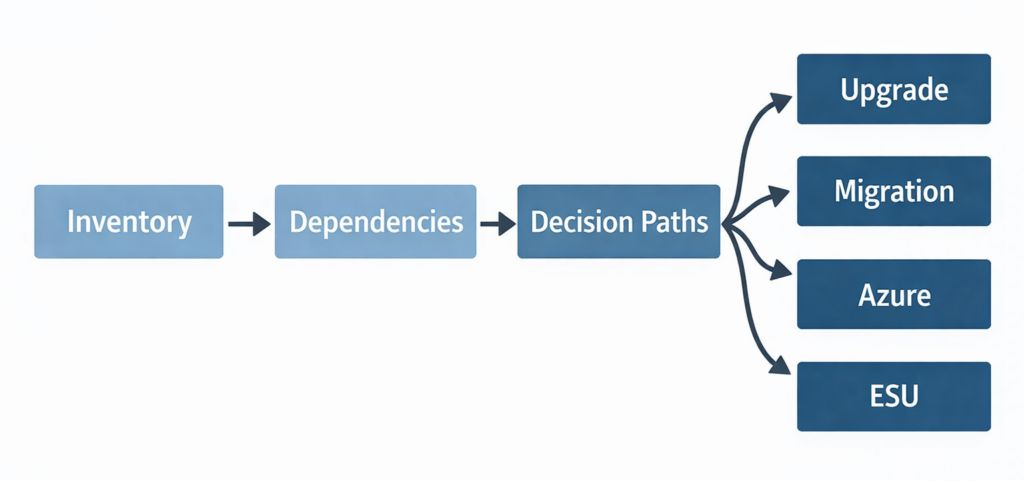
Four areas to review before SQL Server 2016 end of support
Before talking about upgrade, migration, Azure, or ESU, companies need an honest inventory. In my view, there are at least four areas that should be reviewed properly, because they usually determine whether the next step is realistic or only looks good in a planning document.
1. Which SQL Server 2016 instances are still running?
This sounds basic, but in larger or historically grown estates this is often where the first surprises appear. A server list alone is not enough, especially if it does not include edition, build level, role, business criticality, connected applications, hosting model, backup and monitoring coverage, and current ownership.
What matters is not just whether an instance exists. What matters is whether the available information is good enough to support a decision. A rough technical inventory may help with discovery, but it is not the same thing as a decision-ready view of the environment.
2. What business and technical dependencies exist?
This is where many decisions become more complicated than expected. In practice, the database version is often only one part of the problem. The harder constraints usually sit around it: legacy applications with limited vendor support, operating system dependencies, middleware constraints, old integrations, fragile jobs, linked servers, SSIS packages, reporting components, or third-party tools that nobody wants to retest under time pressure.
This part is underestimated in many organizations. The biggest problem is often not technical feasibility in isolation, but the accumulated dependency footprint around the system. An upgrade may be possible from a SQL Server perspective and still be difficult because the surrounding application and operational model has not been prepared for change.
3. Which SQL Server 2016 end of support option is realistic?
Microsoft outlines the general SQL Server end of support options in its documentation. That overview is useful, but it does not answer the operational question for a specific environment.
The real question is not only: “What options exist?” The more important question is: “Which option is realistic for this system, with acceptable risk, acceptable effort, and within the available time window?”
That difference matters. Upgrade, migration, Azure, and ESU are not interchangeable labels. Each option has consequences for testing, downtime, fallback, licensing, application support, operations, monitoring, security, and long-term maintainability. This is where wishful thinking and planning discipline usually start to separate.
4. Is ESU a valid SQL Server 2016 end of support strategy?
ESU can be a valid option, but only if it is used consciously as a temporary bridge. Microsoft describes the ESU program as a last-resort option and a short-term way to stay protected while moving toward a newer supported platform. Microsoft offers it for up to three years after the end of extended support.
What ESU typically does not solve is just as important. It does not fix poor visibility, weak documentation, outdated architecture, unclear ownership, legacy application constraints, or a lack of testing and migration readiness.
ESU can buy time, but it does not automatically improve documentation, ownership, testing, or migration readiness. Used well, it can support a controlled transition. Used poorly, it can simply postpone the same unresolved decisions into the next budget cycle. For additional details, see the Microsoft Extended Security Updates FAQ.
Upgrade, migration, Azure, or ESU: a more realistic view
One of the most common mistakes is to assume there is one obvious default answer. In reality, the right path depends on the application landscape, infrastructure condition, support requirements, risk tolerance, available time, and the operating model the company wants to support after the transition.
When an upgrade can make sense
An upgrade is often the right choice when the application is supported on a newer SQL Server version, the current platform is still broadly viable, and testing, downtime planning, and fallback are realistic. In many cases, this is the most pragmatic route, especially when the main issue is the SQL Server version itself and not the surrounding architecture. Still, a pragmatic path is not an automatic one; it needs proper preparation, especially where compatibility, maintenance windows, rollback options, application testing, and operational handover matter.
When migration is the better option
A migration can be the stronger decision when the current environment needs more than a version change. That may be the case when infrastructure is already due for replacement, when the existing setup no longer matches availability or security requirements, or when operational processes have moved beyond what the current platform should continue to carry.
This matters because the technically possible route is not always the operationally sensible one. Sometimes the end of support date is not only a deadline, but also a useful point to stop investing effort into a platform layout that should have been replaced anyway.
When Azure is worth serious consideration
Microsoft’s end-of-support guidance explicitly points to Azure-related paths such as Azure SQL Managed Instance, SQL Server on Azure Virtual Machines, and Azure VMware Solution, depending on whether the goal is modernization, near-term relocation, or a more gradual transition.
But Azure is not a shortcut by itself. Questions around application behavior, latency, responsibilities, operations, cost, and migration sequencing still remain. Azure makes sense when it fits how the company wants to operate, monitor, secure, and support the environment afterwards. It is a poor choice when it is selected only as a reflex to an end-of-support deadline.
When ESU is defensible
ESU is defensible when there is a clear target strategy, when the environment cannot be changed cleanly in the short term, and when the transition period is intentionally limited. It can be a reasonable bridge for systems that need more time because of vendor constraints, testing effort, application dependencies, or sequencing with other infrastructure work.
ESU becomes problematic when it mainly covers up delay, uncertainty, or organizational indecision. If there is no defined next step, no ownership, and no realistic timeline, ESU does not solve the core problem. It only makes the unresolved situation look temporarily controlled.
What companies should do before SQL Server 2016 end of support
Organizations still running SQL Server 2016 do not need panic, but they do need structure. A useful first step is not to jump straight into a preferred technology path. It is to build a reliable inventory and ask a small set of hard questions:
- Which instances are affected?
- Which applications and business processes depend on them?
- Which vendor, platform, and operational constraints exist?
- Which path is realistic per system: upgrade, migration, Azure, or ESU?
- Where is immediate action required, and where is a managed transition acceptable?
Only once those questions are answered does this become a manageable program instead of a late-stage lifecycle reaction. Without that clarity, organizations often spend too much time discussing the preferred solution and too little time understanding the actual starting point.
Where inventory, dependencies, and realistic next steps are still unclear, structured SQL Server consulting services can help create a practical view of the environment and define the next steps system by system.

Final thought
SQL Server 2016 end of support is not something that can be handled well with a generic “we will just upgrade it” response. The date is clear, but the harder part is what sits behind it: incomplete inventory, unclear dependencies, missing vendor certification, legacy applications, and decisions that were deferred for too long.
Good decisions in these environments rarely depend on the version number alone. They depend on the quality of the inventory, the understanding of dependencies, the ability to prioritize correctly, and an operational logic that looks for the most sustainable path, not just the fastest one.
If SQL Server 2016 is still in use today, the priority is not to decide too quickly between upgrade, migration, Azure, or ESU. The priority is to understand the starting point well enough that the chosen path is realistic, supportable, and defensible in the specific environment.
If you are currently reviewing SQL Server 2016 environments and want an independent second opinion on inventory, dependencies, or realistic next-step options, get in touch.
Comments are closed.