
In SQL Server troubleshooting, the first signal is often not a clear technical error message. It is usually something less precise: an application feels slower than usual, reports no longer finish in the expected time, or users begin to avoid certain screens because they no longer respond reliably.
At that point, SQL Server is often quickly suspected, and sometimes that suspicion is justified. But in my experience, the first visible symptom is rarely enough to identify the real cause. High CPU usage, slow disk activity, blocking sessions, or long-running queries can all be part of the picture, but they do not automatically explain why the system became slow in the first place.
A useful performance analysis therefore has to separate symptoms from causes. That usually means resisting the temptation to change settings too quickly, add indexes blindly, or move the discussion straight to more hardware. The goal is to understand what changed, where SQL Server is spending time, and which part of the workload is actually responsible for the pressure.
Common Symptoms of a Slow SQL Server
A slow SQL Server usually becomes visible through the application first. Users notice that screens take longer to load, reports no longer finish within the expected time, or business processes that used to run quietly in the background suddenly delay daily work.
- Applications respond slowly or freeze
- Reports take much longer than expected
- CPU or disk usage stays high
- Users complain that “the system is slow”
These symptoms are important, but they are not a diagnosis. They show that the system is under pressure, not why that pressure exists. This distinction matters because the wrong interpretation often leads to the wrong fix. A storage graph may look bad because SQL Server is reading too much data. CPU may be high because one execution plan changed. Blocking may look like a general performance issue, although the real problem is a long-running transaction holding locks for too long.
What Causes a Slow SQL Server?
There is rarely one universal reason why SQL Server becomes slow. The cause depends on the workload, the amount and distribution of data, the indexing strategy, concurrency patterns, maintenance, and often also on decisions that were made long before the current problem became visible. Many systems have grown over years, and performance problems often appear when several small decisions finally meet a changed workload.
Inefficient Execution Plans
One of the most common causes of SQL Server performance problems is an inefficient execution plan. SQL Server may choose a plan that is technically valid, but no longer suitable for the amount of data, the parameter values, or the current distribution of rows.
This can result in table scans where an index seek would be more appropriate, join strategies that do not fit the actual row counts, or plans based on outdated statistics. The effect is usually not subtle: SQL Server reads and processes far more data than necessary, which increases CPU load, IO activity, memory usage, and query duration.
That is why I would not treat the execution plan as a detail only relevant for tuning specialists. In many performance cases, it is where the real story becomes visible.
Missing or Incorrect Indexes
Indexes are essential for stable SQL Server performance, but the problem is not always that an index is missing. In practice, poor index design can be just as damaging as no index at all.
A table may be missing an index on columns that are used frequently for filtering or joining. Another table may have too many indexes, which makes write operations unnecessarily expensive. In other cases, indexes exist, but they do not match the real query patterns of the application anymore.
That is why indexing should not be based only on missing-index hints or assumptions. It has to be aligned with the actual workload, the read/write pattern, the data distribution, and the operational cost of maintaining those indexes over time.
Parameter Sniffing Issues
Parameter sniffing is another classic reason why SQL Server performance can be unstable. A query may be compiled for one parameter value and then reuse the same plan for very different values. Depending on the data distribution, that reused plan may be excellent for one execution and poor for the next one.
This is one reason why teams sometimes describe a SQL Server problem as unpredictable: the query is fast in one situation, slow in another, and difficult to reproduce when someone finally starts troubleshooting. The query text may not have changed at all, but the selected plan is no longer appropriate for every relevant execution pattern.
Blocking and Waiting Tasks
Blocking can make an otherwise capable SQL Server look slow, especially in transactional systems. In those cases, the main problem is not always raw CPU, memory, or storage performance. The problem may be that sessions are waiting for other sessions to release locks.
Typical causes include long-running transactions, poor transaction design, or lock escalation. Wait types such as LCK_M_* can indicate locking-related pressure, but they still need context. A wait type tells you what SQL Server is waiting on. It does not automatically tell you whether the root cause is application behavior, transaction scope, missing indexes, or a batch process running at the wrong time.
IO and Storage Bottlenecks
Storage is an important part of SQL Server performance, and slow storage, overloaded shared storage, poor file placement, or TempDB contention can all contribute to performance problems. But this is also an area where teams often jump to conclusions too early.
High IO does not always mean that storage is the original problem. It may simply mean that SQL Server is reading too much data because of inefficient queries, missing indexes, bad estimates, or unsuitable execution plans. In that situation, replacing storage may reduce the pain for a while, but it does not fix the reason why so much unnecessary work is being done.
How to Analyze SQL Server Performance
When SQL Server is slow, a structured analysis matters more than a fast reaction. Random changes may produce temporary improvement, but they also increase risk because nobody can clearly explain which change helped and why.
A good analysis usually combines several perspectives: resource usage, expensive queries, wait statistics, execution plans, and historical performance data if available. None of these areas is sufficient on its own. Together, they help build a more reliable picture.
Step 1: Check Resource Usage
The first step is to understand where the system is under visible pressure. CPU usage, memory pressure, and disk IO are useful starting points because they show which part of the system is currently busy or saturated.
- CPU usage
- Memory pressure
- Disk IO
These indicators help narrow the direction of the analysis, but they should not be treated as the final answer. High CPU does not automatically mean that the server needs more processors. High IO does not automatically mean that the storage layer is too slow. The next question is always what caused that pressure.
Step 2: Identify Top Queries
In many performance cases, only a small number of statements are responsible for a large part of the workload. Identifying those queries is often more useful than looking at the server only from the infrastructure side.
SELECT TOP 10
 qs.total_worker_time,
 qs.total_logical_reads,
 qs.execution_count,
 qt.text
FROM sys.dm_exec_query_stats qs
CROSS APPLY sys.dm_exec_sql_text(qs.sql_handle) qt
ORDER BY qs.total_worker_time DESC;
This query can be a practical starting point for finding expensive statements. It should still be interpreted carefully because it reflects what is visible in the plan cache. It does not replace a full analysis, but it can quickly show where SQL Server has spent significant CPU time or logical reads.
Step 3: Analyze Wait Statistics
Wait statistics help explain what SQL Server is waiting on internally. They are valuable because they shift the discussion from vague statements like “the database is slow” to more concrete questions: is SQL Server waiting on CPU scheduling, IO, locks, memory grants, or something else?
SELECT TOP 10 *
FROM sys.dm_os_wait_stats
ORDER BY wait_time_ms DESC;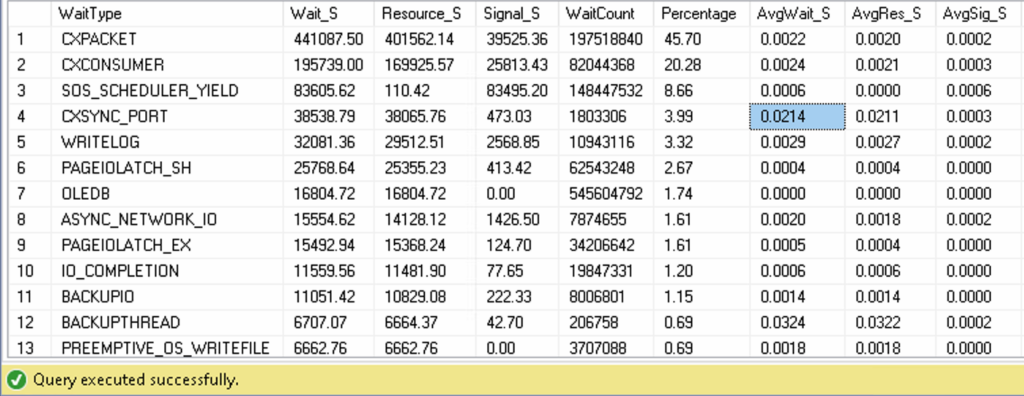
Wait statistics are not a magic answer, but they are a useful compass. They show where to look next. If locking waits dominate, the next step is different from an environment dominated by IO waits or CPU-related pressure.
Step 4: Review Execution Plans
Execution plans often reveal why a query is expensive. They show whether SQL Server is reading more rows than expected, using inefficient join strategies, spilling to TempDB, relying on poor estimates, or missing a useful access path.
- Missing or unsuitable indexes
- Expensive operators
- Cardinality estimation problems
- Poor join choices
Without reviewing the plan, many optimizations remain educated guesses. This is especially important when the visible pressure is on CPU or IO, because the root cause may still be a query plan that forces SQL Server to do far more work than necessary.
Step 5: Use Query Store
If Query Store is enabled and contains useful history, it can make performance changes much easier to reconstruct. It helps compare runtime behavior, detect plan regressions, and identify when a query became slower.
- Detect plan regressions
- Compare query performance over time
- See when performance became worse
This is especially useful when a problem appears suddenly and the team needs to understand whether a query, a plan, or the workload changed.
Common Mistakes When SQL Server Is Slow
One of the most common mistakes in SQL Server troubleshooting is reacting too quickly to the most visible symptom. That reaction is understandable, especially when business-critical systems are affected, but it often moves the team toward the wrong layer of the problem.
- “We need more hardware”
- “The database server is the problem”
- “It worked before, so it must be Windows or the SAN”
None of these assumptions is automatically wrong. Hardware can be undersized. The database server can be the bottleneck. Storage can be overloaded. The problem is making those conclusions before the workload, waits, queries, and plans have been reviewed.
In many real environments, the cause is more specific: a plan regression, a small number of expensive statements, poor indexing, blocking, changed data distribution, or a workload pattern that has slowly outgrown the original design. Structured analysis matters because it reduces the risk of fixing the wrong thing.
When to Ask for Expert Help
There is no fixed rule for when external SQL Server support is needed. In some environments, the internal team has enough SQL Server experience and mainly needs time. In others, SQL Server is only one part of a broader infrastructure responsibility, and deep performance troubleshooting is not available when the issue becomes urgent.
Expert support becomes useful when the business impact is growing, the root cause is still unclear, or several changes have already been tried without a reliable explanation of the result.
- The issue persists and affects daily operations
- No clear root cause has been identified
- Business-critical systems are affected
- Internal teams do not have deep SQL Server troubleshooting experience
At that point, an experienced external view can help bring structure into the analysis, avoid blind changes, and focus the troubleshooting effort on the areas most likely to explain the slowdown.
Conclusion
A slow SQL Server should not be treated as a single symptom with a standard fix. The important step is to separate visible pressure from technical cause: which queries changed, which plans are used, where sessions are waiting, and whether the system is limited by CPU, IO, memory, locking, or design decisions.
In many cases, performance can be improved without adding new hardware. But the reliable path is not guessing. It is measuring, comparing, reviewing execution plans, understanding the workload, and then changing the right part of the system with a clear reason.
If your SQL Server is slow and the root cause is still unclear, you can find more about my SQL Server services or contact me directly to discuss the situation.
Frequently Asked Questions
Why is my SQL Server suddenly slow?
A SQL Server can suddenly appear slow because of a plan change, blocking, parameter sniffing, increased workload, or storage pressure. The visible slowdown is often triggered by a deeper technical cause, so the first step should be structured analysis rather than guessing.
Can missing indexes make SQL Server slow?
Yes, missing indexes can cause SQL Server to scan large amounts of data. However, incorrect or excessive indexing can also create performance problems, especially on write-heavy systems. Indexing should always be checked against the real workload.
Should I add more CPU if SQL Server is slow?
Not immediately. High CPU usage is often a symptom, not the real cause. Before scaling hardware, it is usually better to analyze top queries, waits, and execution plans to understand why SQL Server is using so much CPU.
What is the best first step when SQL Server is slow?
The best first step is to collect evidence: resource usage, top queries, wait statistics, and execution plans. Without that context, changes are mostly guesswork and may address the visible symptom instead of the actual cause.
Recommended further reading:

Comments are closed.